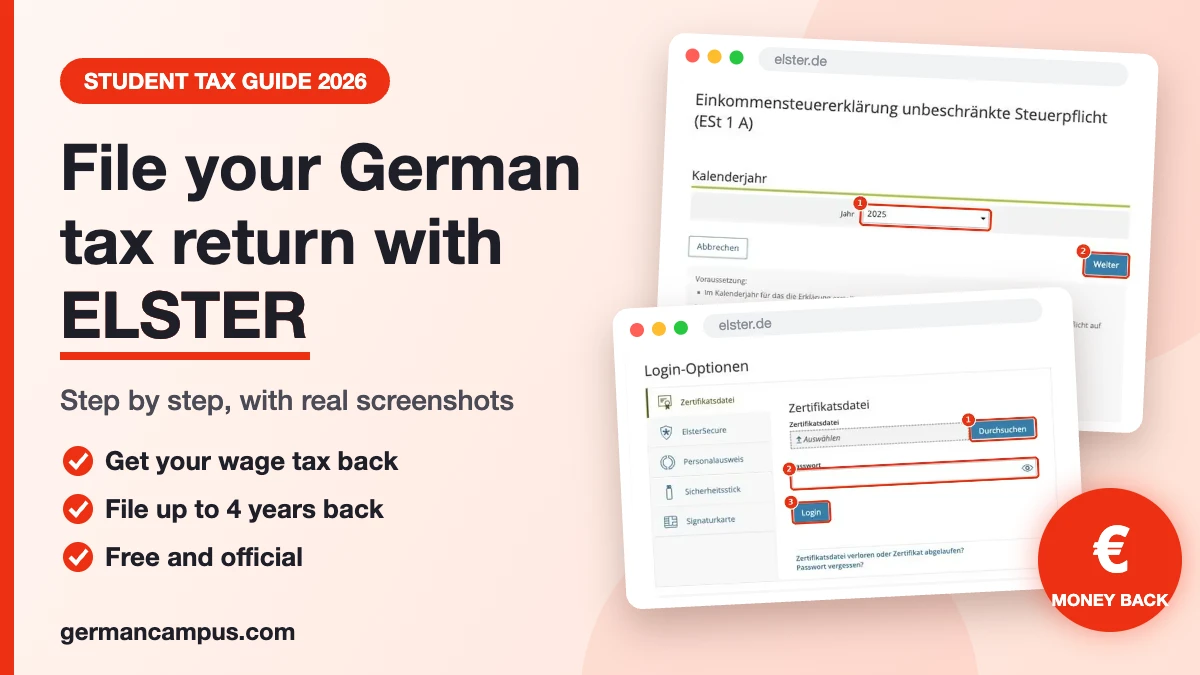

Last updated: By Kumar Ashish, German Campus
A student asked me last week: “I want to do my tax return, but I have no idea where to start. What is ELSTER, how long do I have, and how does it actually work?” If that sounds like you, this guide is for you.
Open this page on one side of your screen and elster.de on the other. I will walk you through every click, with real screenshots from the ELSTER portal and a plain English translation of the German words you will see. No tax knowledge needed.
Quick answer (read this first)
- ELSTER is the free, official online tax office of Germany. You file your tax return at elster.de.
- Most students do not have to file, but many should, because tax taken from your salary often comes back as a refund.
- You have 4 years to file voluntarily. Until 31 December 2026 you can still file for 2022, 2023, 2024 and 2025.
- If you must file (for example tax class VI with two jobs), the 2025 return was due on 31 July 2026. File as soon as you can.
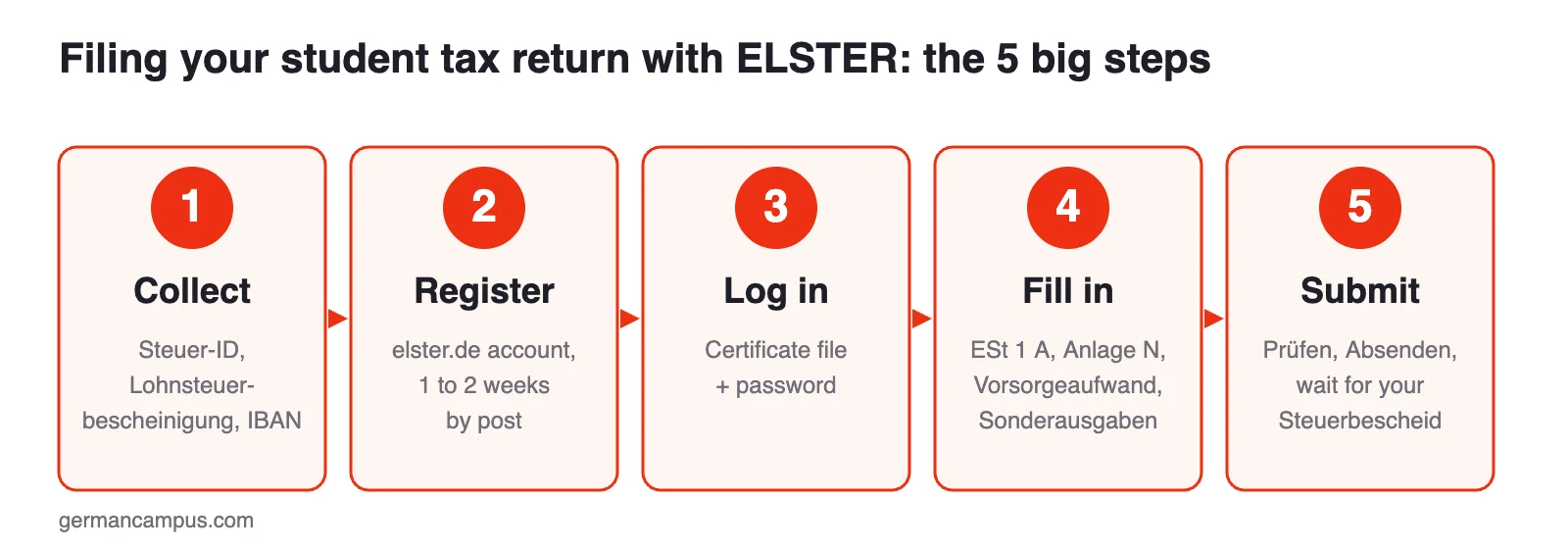
- Plan 1 to 2 weeks for the ELSTER registration, because the activation code usually comes by post.
- The form you need is called ESt 1 A, plus Anlage N (salary) and Anlage Vorsorgeaufwand (insurance).
In this guide (tap to jump):
- Will you get money back? The 2-minute check
- Why students should file
- Do you have to file?
- Deadlines and the 4-year rule
- Your tax year calendar
- What you need before you start
- Step 1: Create your ELSTER account
- Step 2: Log in
- Step 3: Open the right form
- Step 4: Fill in your return
- The money checklist: what you can deduct
- Step 5: Check and submit
- Special situations
- What happens after you submit
- How to read your Steuerbescheid
- Alternatives to ELSTER
- Common mistakes
- FAQ
Why should a student file a tax return in Germany?
Because it is often free money. When you work as a working student (Werkstudent), in a summer job or in a part-time job, your employer deducts wage tax (Lohnsteuer) every month as if you earned that salary all year long. Students rarely do. At the end of the year, your total income is often below the tax-free allowance (Grundfreibetrag), and the tax office pays the difference back.
| Tax year | Tax-free allowance (Grundfreibetrag) |
|---|---|
| 2025 | €12,096 |
| 2026 | €12,348 |
A simple example: you worked full time during the summer break and earned €2,400 per month for three months. Your employer withheld wage tax each month. Your yearly income was only €7,200, which is far below €12,096. With a tax return, you get that wage tax back.
You will typically get money back if:
- Wage tax (Lohnsteuer) was deducted from your salary in some months, but your yearly income was low.
- You had a second job in tax class VI.
- You started or stopped working in the middle of the year.
- You had high work or study costs, for example a laptop, books, tuition or travel.
- You are doing a second degree (for example a master’s after a bachelor’s) and want to save losses for later. More on that below.
You usually will not get anything back from a Minijob (up to €603 per month in 2026) when your employer pays a flat-rate tax for you. In that case no wage tax was taken from you.
Want a quick estimate before you start? Try our tax refund calculator and the net salary calculator.
Will you get money back? The 2-minute check
Before you spend an evening on ELSTER, find out if it is worth it. Take your Lohnsteuerbescheinigung (or your last payslip of the year) and answer these questions:
| Question | If yes |
|---|---|
| Is there an amount above €0 in line 4 (Lohnsteuer) of your Lohnsteuerbescheinigung? | Good sign. This is the tax you can get back. |
| Did you work only part of the year (for example only in the summer break)? | Very likely refund. Your employer taxed you as if you earned that salary all year. |
| Did you have two jobs at the same time, one in tax class VI? | Very likely refund. Tax class VI takes a lot of tax from the first euro. |
| Did you spend more than €1,230 on work, for example travel to work, a laptop or work equipment? | Extra refund, because you can deduct your real costs. |
| Are you doing a master’s or a second degree with tuition, laptop or travel costs? | File even without income. Your costs become a loss that saves you tax later. |
| Did you only have a Minijob with a flat-rate tax paid by the employer? | Usually no refund, because no tax was taken from you. |
The simple rule of thumb
Take your yearly gross salary (line 3) and subtract €1,230 (the work cost flat rate). If the result is below €12,096 (the tax-free amount for 2025), you will usually get back almost all of the wage tax in line 4. Your insurance contributions reduce your taxable income even further, so the real picture is often better.
Worked example: Priya, working student
Priya studies in Hamburg. In 2025 she worked as a Werkstudentin, and in the summer break she worked full time for three months. Her Lohnsteuerbescheinigung shows:
| Line | What it shows | Amount |
|---|---|---|
| 3 | Gross salary for the year | €9,600 |
| 4 | Wage tax withheld | €412 |
| 5 | Solidarity surcharge | €0 |
- Gross salary: €9,600
- Minus work cost flat rate: €1,230
- Income from work: €8,370
- This is far below the tax-free amount of €12,096, so her income tax for the year is €0.
- Result: the tax office pays back the full €412.
It took Priya about one hour in ELSTER, once her account was active. If she also files for the two years before, the refunds add up.
Good to know
- If your only income was salary from one employer at a time, a voluntary return very rarely ends in a back payment. If your situation is more complex (two jobs at once, side business, income abroad), check first or ask a Lohnsteuerhilfeverein.
- There is no minimum amount. Even €50 back is your money.
- You can file for up to 4 years back, so check old Lohnsteuerbescheinigungen too.
Do you have to file? Mandatory or voluntary
For most students, filing is voluntary. You must file if, for example:
- You worked in tax class VI (a second job with a different employer at the same time).
- You had other income over €410, for example from freelancing or renting out a room.
- You received wage replacement benefits over €410, such as unemployment benefit (Arbeitslosengeld I), parental benefit or sickness benefit.
- You had a tax allowance (Freibetrag) entered for your wage tax.
- The tax office (Finanzamt) asked you in writing to file.
Important: the tax office does not remind you. If one of these points applies, it is your job to file.
How long do you have to file? Deadlines explained
| Situation | Deadline |
|---|---|
| Voluntary return for 2022 | 31 December 2026 |
| Voluntary return for 2023 | 31 December 2027 |
| Voluntary return for 2024 | 31 December 2028 |
| Voluntary return for 2025 | 31 December 2029 |
| Mandatory return for 2025, filing yourself | 31 July 2026 (already passed, file now) |
| Mandatory return for 2025, with a tax adviser or Lohnsteuerhilfeverein | 1 March 2027 |
The 4-year rule: a voluntary return can be filed up to four years after the end of the tax year. This means you can file several old years at once, one return per year. If you worked in 2022, do that one first, because it expires on 31 December 2026.
Missed a mandatory deadline? File as soon as possible. The tax office can charge a late filing fee (Verspätungszuschlag). The sooner you file, the smaller the problem.
Your tax year calendar: what happens when
| When | What happens | What you do |
|---|---|---|
| January to February | Your employer sends your yearly salary data to the tax office. | Keep your Lohnsteuerbescheinigung when it arrives (paper or digital). |
| End of February | Employers and health insurers must report your data by now. | Request the Belegabruf activation in ELSTER if you have not done so. |
| From around March | Your data usually becomes available in ELSTER. | Start your return. With Belegabruf most numbers are filled in for you. |
| Any time in the year | The tax office processes returns as they come in. | The earlier you file a voluntary return, the earlier you get your money. |
| 31 July | Deadline for mandatory returns (the previous year). | If you must file, submit before this date. |
| 31 December | The 4-year window for the oldest year closes. | In 2026: file your 2022 return before 31 December 2026. |
What you need before you start
Collect these things first. It makes the rest much faster.
| Document | What it is | Where you get it |
|---|---|---|
| Tax ID (Steuerliche Identifikationsnummer) | Your personal 11-digit tax number for life | Letter from the Federal Central Tax Office after your address registration. Also printed on your payslip. |
| Lohnsteuerbescheinigung | Your yearly salary and tax summary | From each employer, usually by the end of February |
| IBAN | Your bank account for the refund | Your banking app |
| Health insurance certificate | Shows what you paid for health and care insurance | Usually sent to the tax office automatically. Ask your insurer if you need it. |
| Receipts for costs | Laptop, books, tuition, travel, work equipment | Your own files and emails |
| Your address | To find your responsible tax office (Finanzamt) | Your registration certificate (Meldebescheinigung) |
Tax ID vs. tax number: the tax ID (Identifikationsnummer, 11 digits) is not the same as the tax number (Steuernummer). If you have never filed before, you usually do not have a tax number yet. That is fine. You can leave it empty and simply choose your tax office.
Lost your tax ID? You can request it again on the website of the Federal Central Tax Office (BZSt). It comes by post.
Step 1: Create your ELSTER account
You only do this once. After that, you can file every year with the same account.
1.1 Open the ELSTER homepage
Go to elster.de and click Benutzerkonto erstellen (create user account).
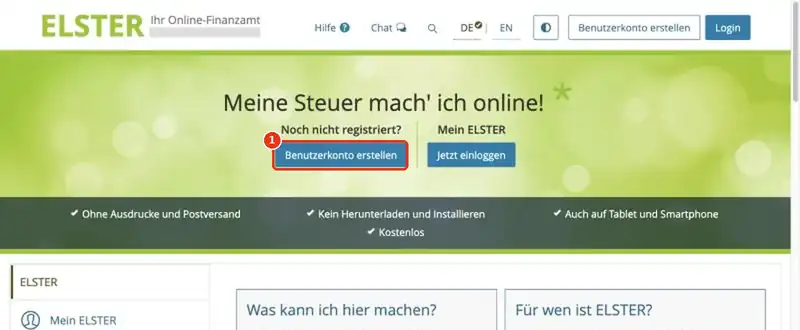
Tip: the EN button at the top switches the information pages to English. The tax forms themselves stay in German, which is why this guide translates every important field for you.
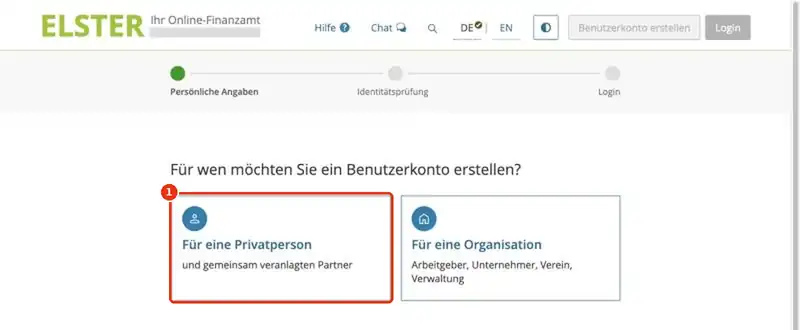
1.2 Choose “Für eine Privatperson”
ELSTER asks who the account is for. Choose Für eine Privatperson (for a private person). Do not choose “Für eine Organisation”, which is for companies and employers.
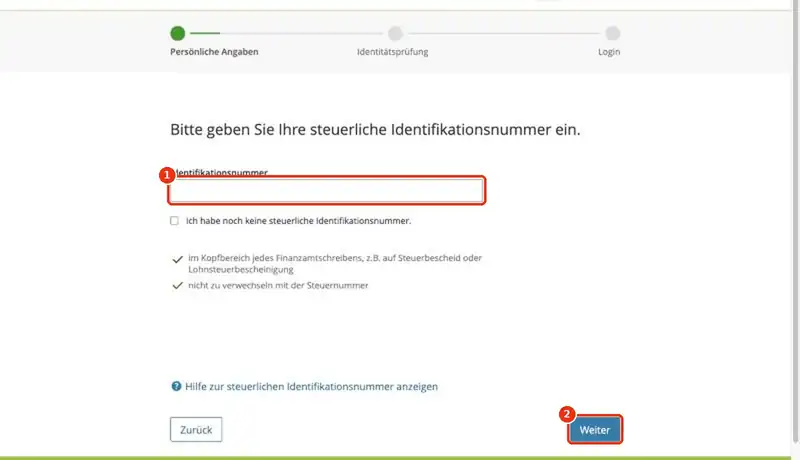
1.3 Enter your tax ID
Type your 11-digit tax ID into the field Identifikationsnummer and click Weiter (next).
1.4 Enter your personal data, email and username
Next, ELSTER asks for your date of birth, your email address and a username you choose. Check everything on the summary page and click Alles richtig (all correct).
1.5 Confirm your email
ELSTER sends a 6-digit code to your email. Enter it and click Code abschicken (send code). Check your spam folder if it does not arrive.
Test your German for freeA1 to C1 in 8 minutes, with your level and a study planStart test →
1.6 Prove your identity
Now ELSTER needs to check that you are really you. You have two options:
| Option | How it works | Good for |
|---|---|---|
| By letter (per Brief) | You get an activation ID (Aktivierungs-ID) by email and an activation code (Aktivierungscode) by post to your German address. The letter usually takes up to about 2 weeks. | Most international students. Works with any registered address. |
| Online | With the online ID function of a German ID card, an EU eID card or an electronic residence permit (eAT), or with the Nect Wallet app. | People whose online ID function is already activated. Much faster. |
If you choose the letter, make sure your name is on your mailbox. When the letter arrives, open the activation page from the link in your email and enter both codes.
1.7 Create your certificate file and password
ELSTER now asks how you want to log in. Choose the certificate file (Zertifikatsdatei). This is the easiest option and works on any computer. Set a strong password and click Jetzt erstellen (create now).
ELSTER then creates a small file ending in .pfx. Download it and keep it safe.
Do not lose your certificate file
- Save the .pfx file in a folder you can find again, for example Documents/ELSTER.
- Make a backup copy on a USB stick or in your private cloud.
- Write your password down somewhere safe. Without the file and the password, you cannot log in.
- The certificate is valid for 3 years. ELSTER reminds you to renew it in time.
Step 2: Log in to ELSTER
Go to elster.de and click Login. On the login page, the tab Zertifikatsdatei is selected by default.
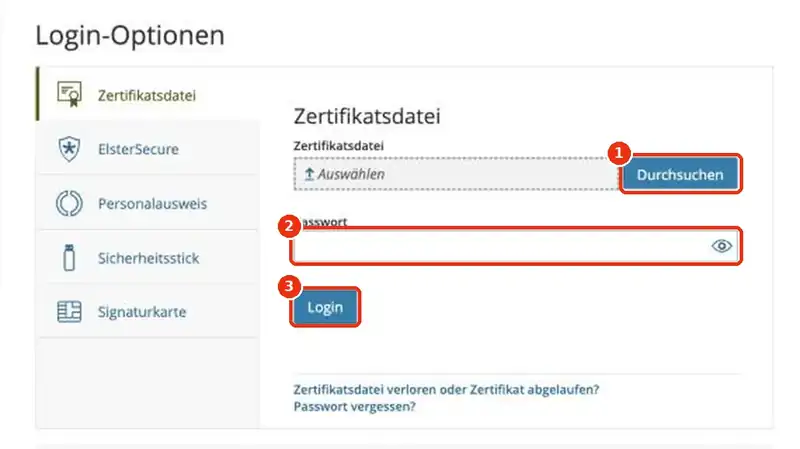
- Click Durchsuchen (browse) and select your .pfx certificate file.
- Type your password into Passwort.
- Click Login.
The very first time, ELSTER shows a data protection notice. Click Bestätigen und Weiter (confirm and continue).
Lost your file or forgot the password? Use the link Zertifikatsdatei verloren oder Zertifikat abgelaufen? below the login button. You will get a new activation code by post.
Optional but very useful: activate Belegabruf
Belegabruf (document retrieval) lets ELSTER fill in your salary, wage tax and insurance data automatically, straight from what your employer and health insurer reported. This saves time and avoids typos. You activate it once in your ELSTER account. It needs a separate activation code, which again comes by post, so request it early. If you are in a hurry, you can also type everything in by hand from your Lohnsteuerbescheinigung.
Step 3: Open the right form (ESt 1 A)
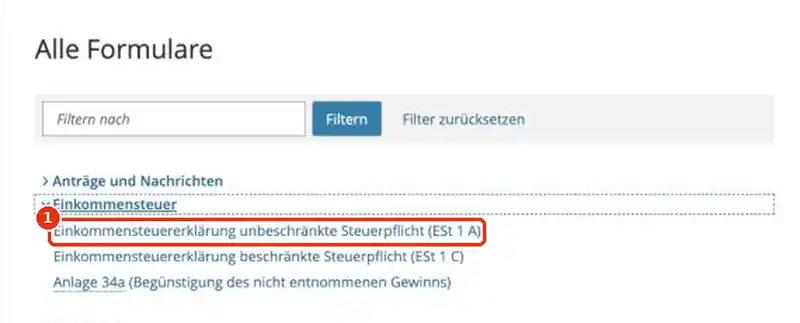
After login, click Formulare und Leistungen (forms and services) in the menu, then Alle Formulare (all forms).
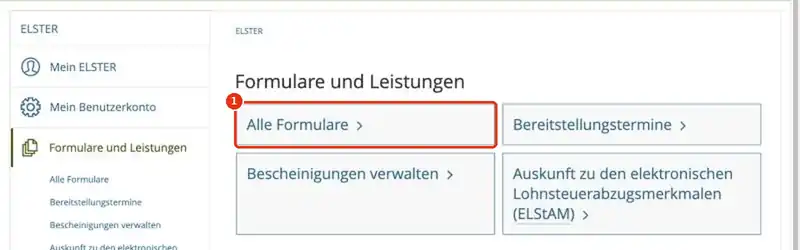
Open the section Einkommensteuer (income tax) and click Einkommensteuererklärung unbeschränkte Steuerpflicht (ESt 1 A). This is the normal income tax return for anyone who lives in Germany.
Now choose the year you want to file for, for example 2025, and click Weiter.
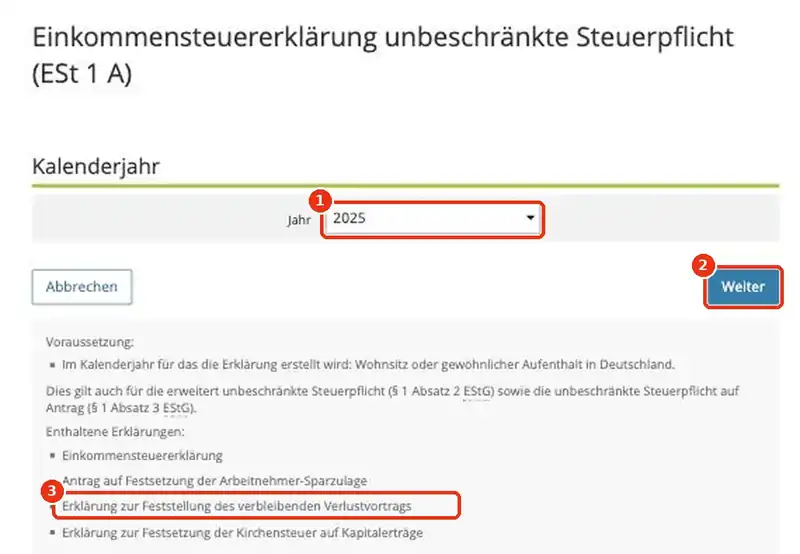
Notice line 3 in the screenshot: the form already includes the declaration of the remaining loss carryforward (Erklärung zur Feststellung des verbleibenden Verlustvortrags). That is important for master’s students, as you will see below.
ELSTER then asks how you want to start. If you activated Belegabruf, choose to take over the reported data. Otherwise, start with an empty form. On the next screen, tick the attachments (Anlagen) you need:
| Form | English | Do you need it? |
|---|---|---|
| Hauptvordruck (ESt 1 A) | Main form | Always. Personal data, address, bank account. |
| Anlage N | Employment income | Yes, if you had a job with a Lohnsteuerbescheinigung. |
| Anlage Vorsorgeaufwand | Insurance contributions | Yes, almost always. |
| Anlage Sonderausgaben | Special expenses | If you study for your first degree and had costs, paid church tax or donated. |
Step 4: Fill in your tax return, field by field
On the left side, ELSTER shows a menu with all parts of the form. Work through it from top to bottom. Fields with a red star are required. You can save at any time with Speichern (save) and continue later.
4.1 Main form (Hauptvordruck)
- Steuernummer / Finanzamt: choose your federal state and the tax office for your address. Leave the tax number empty if you never had one.
- Angaben zur Person: your name, date of birth, address, tax ID. Religion only matters if you pay church tax.
- Bankverbindung: your IBAN. This is where your refund goes. Check it twice.
4.2 Your salary: Anlage N
Take your Lohnsteuerbescheinigung (the yearly certificate from your employer). Every number on it has a line number. This picture shows which ones matter and where they go:
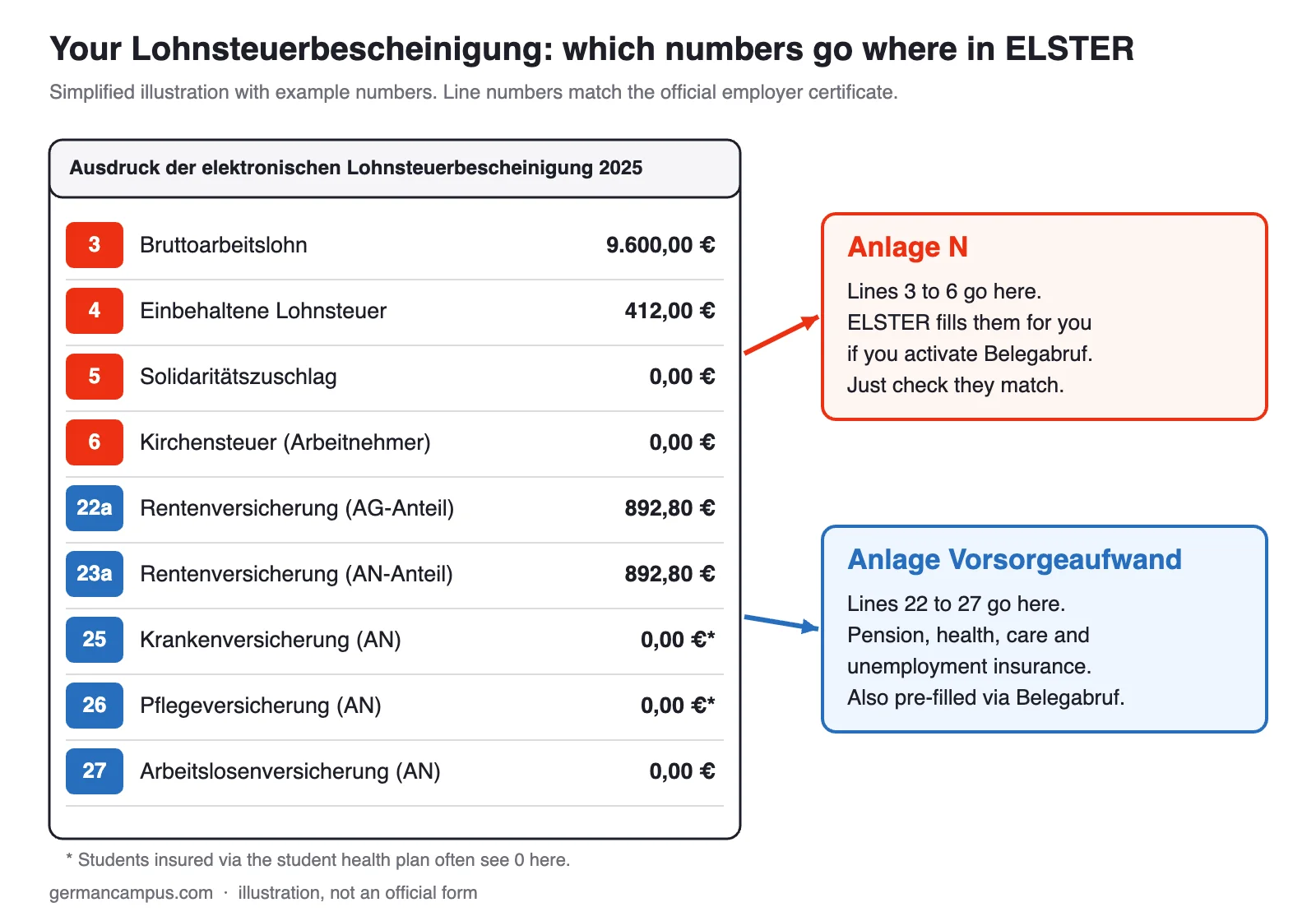
| Line on your certificate | What it means | Where it goes in ELSTER |
|---|---|---|
| 3 | Gross salary (Bruttoarbeitslohn) | Anlage N |
| 4 | Wage tax withheld (Lohnsteuer) | Anlage N |
| 5 | Solidarity surcharge (Solidaritätszuschlag) | Anlage N |
| 6 and 7 | Church tax (Kirchensteuer) | Anlage N |
| 22 to 27 | Pension, health, care and unemployment insurance | Anlage Vorsorgeaufwand |
With Belegabruf, these numbers are already filled in. Just compare them with your certificate. If you had two jobs, you enter each certificate separately.
Work-related costs (Werbungskosten): ELSTER automatically deducts a flat €1,230 for work costs (Arbeitnehmer-Pauschbetrag). Only enter your real costs if they are higher, for example:
- Travel to work: the commuting allowance (Entfernungspauschale). For 2025 it is €0.30 per km for the first 20 km and €0.38 from km 21. From 2026 it is €0.38 from the first km. Count one way only.
- Home office: €6 per day, up to €1,260 per year.
- Work equipment, for example the work share of a laptop.
4.3 Insurance: Anlage Vorsorgeaufwand
Here go your pension, health and care insurance contributions (lines 22 to 27 of your certificate). If you pay your student health insurance yourself, your insurer normally reports it to the tax office. With Belegabruf you will see it pre-filled.
4.4 Study costs: first degree or second degree?
This is the part most students get wrong, and it can be worth a lot of money.
| First degree (Erststudium) | Second degree (Zweitstudium) | |
|---|---|---|
| Example | Your bachelor’s, with no finished vocational training before | Your master’s after a bachelor’s, or a degree after a finished Ausbildung |
| How costs count | Special expenses (Sonderausgaben) | Work-related costs (Werbungskosten) |
| Where to enter | Anlage Sonderausgaben | Anlage N |
| Limit | Up to €6,000 per year | No fixed limit |
| If you had no income | Lost. Nothing is carried forward. | Becomes a loss that is carried forward to the year you start working. |
Master’s students, read this: if your study costs are higher than your income, you get a loss carryforward (Verlustvortrag). This loss is saved and later reduces the tax on your first full-time salary. To get it, you must file the return and request the loss assessment. In ELSTER it is already part of the ESt 1 A form, as the screenshot in Step 3 shows. You can often do this for past years too, but the exact rules are technical, so ask a Lohnsteuerhilfeverein if large amounts are involved.
Typical study costs you can list:
- Tuition and semester fees (keep the payment proof)
- Laptop and other equipment (the study share)
- Books and study materials
- Travel to university and for study trips
- Language courses linked to your studies or job
- Interest on a student loan
Keep your receipts. You do not have to upload them now, but the tax office may ask for them later.
The money checklist: everything students can deduct
This is where most students leave money on the table. Go through this list with your bank statements and emails open. Everything you find either lowers your tax now or (for master’s students) builds up a loss for later.
1. Work costs (Werbungskosten) in Anlage N
ELSTER automatically gives you €1,230 for work costs. Add your real costs only if together they are higher. They often are once you count everything:
| Cost | What you can claim | Tip |
|---|---|---|
| Travel to work | Commuting allowance per working day and km, one way (2025: €0.30 for the first 20 km, €0.38 from km 21; 2026: €0.38 from the first km) | Count every day you actually went to work. Works for bike, bus, car or walking. |
| Home office | €6 per day, up to €1,260 per year | For days you worked only from home. |
| Laptop, tablet, phone | The share you use for work. Items up to €800 net (€952 incl. VAT) can be claimed in one year. | Keep the invoice. Many tax offices accept a 50% work share without discussion. |
| Phone and internet | The work share. Many tax offices accept 20% of your bill, up to €20 per month, without detailed proof. | Just enter the yearly total of that share. |
| Bank account fees | Many tax offices accept a flat €16 per year for employees. | Write it as Kontoführungsgebühren. |
| Job applications | Printing, photos, postage, travel to interviews | Also for applications that did not work out. Keep a simple list. |
| Moving for a job | Moving costs if you moved because of a new job or to live much closer to work | Keep the van rental and travel receipts. |
| Work clothes and tools | Typical work clothing (for example safety shoes, a chef uniform) and tools | Normal clothes do not count, even if you only wear them at work. |
| Training and courses | Courses, books and language classes linked to your job | For a second degree, all study costs go here. |
2. Special expenses (Sonderausgaben)
- First degree costs: tuition, semester fees, books, laptop share, travel to university. Up to €6,000 per year in Anlage Sonderausgaben. Only useful if you have taxable income in the same year.
- Health and care insurance: your basic contributions count in full. If you pay student insurance yourself, it is usually pre-filled.
- Church tax: church tax you paid during the year.
- Donations: to charities. For up to €300, your bank statement is enough as proof.
3. The tenant tip most students miss: your utility bill
If you rent a flat or a room, look at your yearly utility bill (Nebenkostenabrechnung). Costs for cleaning of the stairs, gardening, caretaker, chimney sweep, winter service and repairs can lower your tax directly. You get 20% of the labour cost as a tax reduction. Enter them in the attachment Anlage Haushaltsnahe Aufwendungen. Ask your landlord for a statement that shows these amounts if your bill does not list them. This only helps if you pay income tax that year.
4. Other costs
- High medical costs (glasses, dentist, therapy) that you paid yourself can count as extraordinary expenses (Anlage Außergewöhnliche Belastungen) above a personal threshold.
- Tax help: fees for a tax app or Lohnsteuerhilfeverein, and tax books, can be entered as work costs.
- Union or professional association fees count as work costs.
Step 5: Check and submit
- Click Prüfen (check). ELSTER lists errors in red and hints in yellow.
- Fix all red errors. Yellow hints are only information.
- Click Absenden (submit) and confirm.
- Download the transmission record (Übertragungsprotokoll) as a PDF and keep it.
That is it. You do not need to print or post anything.
Special situations explained simply
You came to Germany during the year
If you moved to Germany in, say, October, you only pay German tax on what you earned while living here. But ELSTER will ask about income you had abroad before you came, because it can slightly raise your German tax rate (Progressionsvorbehalt). You enter this in a separate attachment (Anlage WA-ESt). If you were a student with no income at home, this is usually zero.
You are leaving Germany or already left
You can still file. ELSTER works from anywhere with your certificate file, so keep a copy before you leave. Refunds can be paid to a German or a foreign IBAN in the SEPA area. Update your address with the tax office so letters reach you.
Two jobs at the same time
Your main job runs in tax class I, the second job in tax class VI. Class VI takes high tax from the first euro, so a return almost always brings money back. In this case filing is mandatory, so do it by 31 July of the following year.
Minijob plus Werkstudent job
A Minijob with flat-rate tax paid by your employer stays outside your tax return. You only enter the Werkstudent job in Anlage N.
Internship (Praktikum)
Salary from a paid internship is taxed like any other salary. If wage tax was taken, you get it back the same way. Travel to the internship counts as work costs.
Scholarship or BAföG
BAföG and most scholarships for students, such as the Deutschlandstipendium, are tax-free. You do not enter them as income.
Freelancing or a small business next to your studies
If you earn more than €410 from freelancing next to your job, filing is mandatory. You need extra attachments (Anlage S for freelance work or Anlage G for a business, plus a simple profit statement called EÜR). This is the point where a Lohnsteuerhilfeverein or tax adviser is worth it.
You are married
Married couples can choose joint assessment (Zusammenveranlagung). If one partner earns much less, this usually saves tax. You file one return together in ELSTER.
What happens after you submit?
- The tax office processes your return. This usually takes several weeks, sometimes a few months.
- You receive your tax assessment (Steuerbescheid) by post or digitally in your ELSTER account.
- If you get a refund, the money goes to the IBAN you entered, usually a few days after the assessment.
- If you think something is wrong in the assessment, you can file an objection (Einspruch) within one month, also through ELSTER.
How to read your tax assessment (Steuerbescheid)
A few weeks after you submit, your Steuerbescheid arrives. It looks complicated, but you only need three parts:
| Part | German word | What to check |
|---|---|---|
| The result | Erstattung (refund) or Nachzahlung (back payment) | The amount and that it matches roughly what you expected. |
| The calculation | Festsetzung / Berechnung | That your gross salary, wage tax and costs were taken over correctly. |
| The explanations | Erläuterungen | If the tax office changed something, they explain it here. Read this part carefully. |
Refund lower than expected? Check these 5 things
- Did the tax office reject some costs? Look at the Erläuterungen.
- Did you enter all jobs and all Lohnsteuerbescheinigungen?
- Did you choose the right place for study costs (first degree in Sonderausgaben, second degree in Anlage N)?
- Was your work cost total below €1,230? Then only the flat rate counted, which is normal.
- Did you have income abroad or wage replacement benefits that raised your tax rate?
If you disagree, you have one month from receiving the assessment to file an objection (Einspruch). In ELSTER you find it under Formulare und Leistungen, then Alle Formulare, then Einspruch. Write in simple words what is wrong and attach proof. An objection is free.
Don’t want to use ELSTER? Your alternatives
| Option | Cost | Good for |
|---|---|---|
| ELSTER | Free | Students with one or two jobs and simple costs. Official and safe. |
| Tax apps (several have an English version) | A fee per return | People who want English and guidance. Many apps use ELSTER in the background. |
| Lohnsteuerhilfeverein (wage tax help association) | Yearly membership fee, usually based on income | Employees with tricky cases, for example foreign income or large study losses. |
| Tax adviser (Steuerberater) | Higher, set by law | Self-employed people and complex situations. |
If you also earned income in your home country in the same year, or you moved to Germany during the year, your case is more complex. A Lohnsteuerhilfeverein can help with that.
7 common mistakes students make
- Waiting too long to register. The activation letter takes time. Register today, even if you file next month.
- Losing the certificate file. Always keep a backup copy.
- Mixing up tax ID and tax number. For registration you need the 11-digit tax ID.
- Forgetting old years. You can still file 2022 until 31 December 2026.
- Putting first-degree costs in Anlage N. First degree costs go to Anlage Sonderausgaben.
- Master’s students not filing at all. Without a return, your loss carryforward is not recorded.
- A wrong IBAN. Check it twice. It is where your refund goes.
Your printable checklist
- Tax ID (11 digits)
- ELSTER account active (certificate file plus password)
- Lohnsteuerbescheinigung from every employer
- IBAN for the refund
- Receipts: laptop, books, tuition, work equipment
- Number of days you went to work and the distance in km
- Number of home office days
- Phone and internet bills
- Utility bill (Nebenkostenabrechnung) from your landlord
- Proof of donations
- For master’s students: list of all study costs
Frequently asked questions
Is ELSTER free?
Yes. ELSTER is the official portal of the German tax administration and completely free.
Is ELSTER available in English?
The information pages have an English version. The tax forms are in German, which is why this guide translates each field you need.
How long does ELSTER registration take?
With the letter option, usually up to about 2 weeks, because the activation code comes by post. With the online ID function or the Nect Wallet app, it can be done on the same day.
Can international students file a tax return in Germany?
Yes. If you live in Germany and earned a salary here, you file exactly like everyone else, with the ESt 1 A form.
I earned less than €12,096 in 2025. Do I get all my wage tax back?
If your total taxable income stays below the tax-free allowance, you usually get the full wage tax back. Your exact refund depends on your whole situation.
Do I need a tax number (Steuernummer) to file?
No. If you never filed before, leave it empty and select your tax office. You will get a tax number with your first assessment.
Can I file several years at once?
Yes, but each year is a separate return. In ELSTER you choose the year when you open the ESt 1 A form.
I only had a Minijob. Should I file?
Usually it is not worth it if your employer paid a flat-rate tax, because no wage tax was taken from your salary. It can still make sense if you are a master’s student and want to record study costs as a loss.
What if I make a mistake after submitting?
Before the assessment arrives, you can send a corrected return. After it arrives, you can file an objection (Einspruch) within one month.
Can I file my tax return in English?
The ELSTER forms are in German, and the tax office expects German. You do not need perfect German though: this guide translates every field you need. Some commercial tax apps have an English interface.
Do I have to send receipts with my return?
No. You keep your receipts at home. The tax office will ask for them only if it wants to check something, so keep them for a few years.
I did not know about tax returns. Can I still get money for past years?
Yes. A voluntary return can be filed up to four years back. In 2026 you can still file 2022, 2023, 2024 and 2025. Each year is a separate return.
What if I get a back payment instead of a refund?
For a voluntary return you can usually withdraw it with an objection before the assessment becomes final. Ask a Lohnsteuerhilfeverein if this happens to you.
How much money do students usually get back?
It depends on how much wage tax was taken. Many working students with low yearly income get back almost all of the wage tax shown in line 4 of their Lohnsteuerbescheinigung.
Can I file if I already left Germany?
Yes. Log in with your certificate file from anywhere and enter your foreign address and IBAN. Make sure you still have your certificate file and password.
What is the difference between Steuerklasse I and VI?
Tax class I is the normal class for single people with one job. Tax class VI is used for a second job at the same time and takes much more tax. A return corrects this.
Related guides on German Campus
- Student tax return guide: deadlines and refunds explained
- Tax refund calculator for Germany
- Net salary calculator: what is left of your gross pay
- Werkstudent job in Germany: complete guide
- Student budget calculator for Germany 2026
Last checked: November 2026. This guide explains the general process and is not individual tax advice. Amounts and rules can change, so check elster.de or ask a Lohnsteuerhilfeverein if your case is complex.
Was this guide helpful?
Thank you! Your feedback helps us keep this guide accurate.